So, you’re thinking about getting a website for your small business? That’s a smart move! In today’s world, it’s pretty much a necessity if you want to reach more customers and make your business look legit.
So, What’s the Big Deal with a Website?
Honestly, it’s your digital storefront. Even if you have a brick-and-mortar place, a website lets people find you 24/7, see what you offer, and learn about your business without having to physically come in. It builds trust, gives you credibility, and is a central hub for all your marketing efforts. It’s not just about looking good; it’s about making your business more accessible and, ultimately, more successful.
Let’s break down how you can actually get this done, step by step.
Before you even think about colors or fonts, you need to know why you need a website. This is going to guide every other decision you make.
What Do You Want Your Website to Do?
Think about the primary goals for your business. What’s the main thing you want people to do when they land on your site?
- Information Hub: Is it mainly for people to find your contact details, opening hours, and a general overview of your services or products? This is common for local service businesses like plumbers, electricians, or even local shops.
- Lead Generation: Do you want people to fill out a contact form, request a quote, or sign up for a newsletter? This is crucial for businesses where the sales cycle is longer or involves consultation.
- E-commerce: Are you planning to sell products directly online? This requires a whole different level of functionality, like shopping carts and payment gateways.
- Portfolio Showcase: For creative professionals or businesses with tangible results (like designers, contractors, photographers), the website might be to display their work and attract new clients based on their past projects.
- Booking & Appointments: For businesses that operate on appointments, like salons, spas, or consultants, direct online booking is a huge benefit.
Who Are You Talking To?
Knowing your target audience is also key. Are you aiming at local residents? A specific demographic? Understanding their needs and online behavior will help you tailor your content and design. What kind of information are they looking for from a business like yours?
Step 2: Choose Your Website Building Approach
You’ve got a few main paths to take when it comes to actually building the site. Each has its pros and cons, and the best one for you depends on your budget, technical skills, and how much control you want.
Option A: DIY Website Builders (The “Easy” Route)
These are platforms designed for people with little to no coding experience. They offer drag-and-drop interfaces and pre-designed templates.
- How They Work: You pick a template, customize it with your own text, images, and branding, and publish it. Think of it like building with digital LEGOs.
- Popular Examples:
- Wix: Known for its extreme flexibility and design options, but can sometimes be a bit overwhelming with the sheer number of choices.
- Squarespace: Offers beautiful, modern templates and a more streamlined editing experience. Great for visually driven businesses.
- Shopify: If e-commerce is your main goal, Shopify is specifically built for selling online and makes it pretty straightforward.
- GoDaddy Website Builder: Often bundled with domain registration, it’s a simpler option for basic business websites.
- Pros: Relatively inexpensive (often a monthly fee), quick to get started, no coding knowledge needed, hosting is usually included.
- Cons: Can be limiting in terms of customizability for very specific needs, migrating away from them can be tricky, some advanced features might require paid add-ons or a higher-tier plan.
Option B: Content Management Systems (CMS) (The “Flexible” Route)
This is where you have more control and scalability. The most common is WordPress.
- How They Work: You install the CMS software on a web hosting account. Then, you use themes (templates) and plugins (extensions for added functionality) to build and customize your site.
- Popular Examples:
- WordPress.org (Self-Hosted): This is the most popular and powerful option. It’s free software, but you’ll need to pay for web hosting and a domain name. It offers immense flexibility and a vast ecosystem of themes and plugins.
- Joomla, Drupal: Other CMS options, but generally have a steeper learning curve than WordPress for beginners.
- Pros: Extremely flexible and scalable, a massive community for support, thousands of themes and plugins available to add virtually any feature, you own your data and have more control.
- Cons: Requires a bit more technical understanding (setting up hosting, installing software), you’re responsible for maintenance (updates, security), can be more expensive initially depending on hosting and premium themes/plugins.
Option C: Hiring a Professional (The “Hands-Off” Route)
This involves paying a web designer or developer to build the site for you.
- How They Work: You collaborate with a professional, explain your needs, and they handle the entire process from design to development and launch.
- Pros: You get a custom-designed, professional website tailored exactly to your needs, saves you time and learning curve, can handle complex functionalities.
- Cons: The most expensive option, finding the right professional can take time, you’ll still need to provide content and feedback.
Step 3: Get Your Domain Name and Hosting Sorted
These are the two fundamental pieces of your website’s online identity.
Your Domain Name: Your Website’s Address
This is what people type into their browser to find you (e.g., yourbusiness.com).
- Choosing a Good Name:
- Keep it Simple & Memorable: Easy to spell, easy to say.
- Relevant to Your Business: Ideally, it should be your business name or a closely related keyword.
- Use .com if Possible: It’s the most recognized and trusted extension. Other options like .net, .org, or country-specific ones (.co.uk, .ca) are also available.
- Avoid Hyphens and Numbers: They can be confusing.
- Where to Get It:
- Domain Registrars: Companies like Namecheap, GoDaddy, Google Domains specialize in selling domain names. You typically pay an annual fee.
- Bundled with Hosting: Many web hosting providers will offer a free domain name for the first year when you sign up for a hosting plan.
Web Hosting: Where Your Website Lives
This is the server space where all your website’s files (text, images, code) are stored so people can access them online.
- Types of Hosting:
- Shared Hosting: The most affordable option. You share server resources with other websites. Good for small businesses with moderate traffic.
- Virtual Private Server (VPS) Hosting: A step up. You get a dedicated portion of a server, offering more control and better performance than shared.
- Dedicated Hosting: The most expensive. You have an entire server to yourself. For very high-traffic, resource-intensive websites.
- Managed WordPress Hosting: Specifically optimized for WordPress sites, often with better security, performance, and support included.
- Popular Hosting Providers: Bluehost, SiteGround, HostGator, WP Engine (for managed WordPress).
- What to Look For: Reliability (uptime), speed, customer support, storage space, bandwidth, and security features.
For DIY builders (like Wix or Squarespace), hosting is usually included in their monthly fees. If you’re going with a CMS like WordPress.org, you’ll need to purchase hosting separately.
Step 4: Design and Content – Making it Look and Sound Right
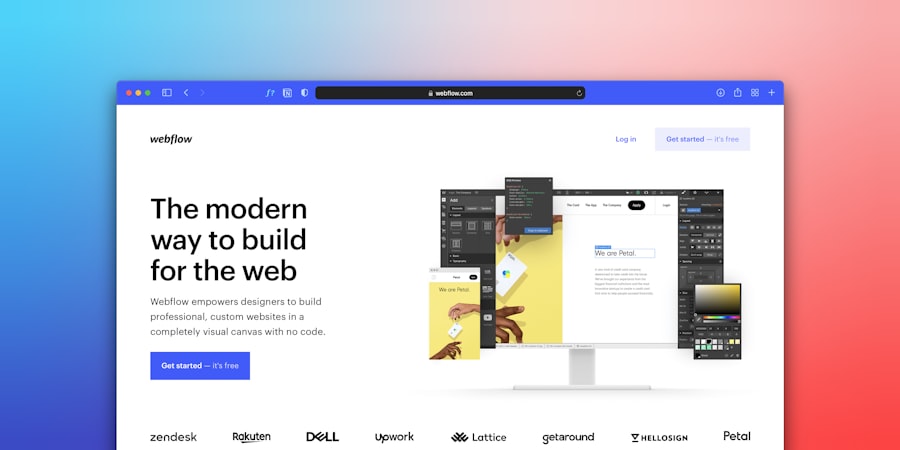
This is where your website starts to take shape and communicate with your visitors.
Designing Your Website
The look and feel of your website are crucial for making a good first impression.
- Choosing a Template/Theme:
- Start with a Purpose: Does the template’s layout support your main goals?
- Mobile-Friendly (Responsive): This is non-negotiable. Your site must look good and function well on smartphones and tablets. Most modern templates are responsive by default.
- Clean and Professional: Avoid cluttered designs. Focus on readability and ease of navigation.
- Branding Consistency: Does it align with your existing logo, colors, and overall brand identity?
- Key Pages to Include:
- Homepage: Your digital welcome mat. It should clearly state what you do, who you serve, and guide visitors to other important sections.
- About Us: Tell your story, introduce your team, and build trust. People want to know who they’re doing business with.
- Services/Products: Detail what you offer, including benefits and any relevant pricing information.
- Contact Us: Make it super easy for people to get in touch. Include your phone number, email, address, and a contact form. A map can be helpful for physical locations.
- Testimonials/Portfolio: Social proof is powerful. Showcase positive reviews or examples of your work.
- User Experience (UX):
- Easy Navigation: Visitors should be able to find what they’re looking for quickly and intuitively. Use clear menu labels.
- Clear Calls to Action (CTAs): Tell people what you want them to do next (e.g., “Get a Free Quote,” “Shop Now,” “Contact Us Today”). Make these buttons stand out.
- Fast Loading Speed: Slow websites frustrate visitors and can hurt your search engine ranking. Optimize images and choose good hosting.
Crafting Compelling Content
Your words are just as important as your visuals.
- Know Your Audience: Use language that resonates with them. Avoid jargon they won’t understand.
- Be Clear and Concise: Get to the point. People often scan web pages. Use headings, subheadings, and bullet points to break up text.
- Focus on Benefits, Not Just Features: Instead of saying “We offer X service,” explain how X service solves a problem or improves their life.
- High-Quality Images and Videos: Use professional-looking visuals that are relevant to your business.
- SEO Basics (Search Engine Optimization):
- Keywords: Think about the terms people would use to search for your business online. Naturally weave these into your page titles, headings, and content.
- Unique Content: Don’t copy content from other websites.
- Alt Text for Images: Describe your images for search engines and visually impaired users.
- Proofread Everything! Typos and grammatical errors can damage your credibility.
Step 5: Launch and Maintain Your Website
You’re almost there! Getting your site online is exciting, but the work doesn’t stop there.
The Launch Process
- Testing: Before you officially launch, thoroughly test every link, form, and button. Check how it looks on different devices and browsers. Have friends or colleagues give it a once-over.
- Go Live: If you used a DIY builder, this is usually a button click. If you’re using a CMS, you’ll typically point your domain name to your hosting server.
- Submit to Search Engines: While search engines will eventually find your site, you can speed things up by submitting your sitemap to Google Search Console and Bing Webmaster Tools.
Ongoing Maintenance and Growth
A website is a living thing; it needs attention to stay effective.
- Regular Updates:
- Content: Keep your information fresh. Add new blog posts, update product details, or announce new services.
- Software (for CMS users): Keep your WordPress core, themes, and plugins updated. This is crucial for security and functionality.
- Security: Protect your website from hackers. Use strong passwords, install security plugins, and consider SSL certificates (often included with hosting, makes your site “https”).
- Backups: Regularly back up your website. If something goes wrong, you can restore it to a previous state.
- Analytics: Install Google Analytics. This will tell you who is visiting your site, how they found you, and what they’re doing on your pages. This data is invaluable for making improvements.
- Marketing: Your website is a tool. You still need to drive traffic to it.
- Social Media: Share your website link and content.
- Email Marketing: Build an email list and send out newsletters or promotions.
- Local SEO: Ensure your Google Business Profile is up-to-date and linked to your website.
- Paid Advertising: Consider Google Ads or social media ads to reach a wider audience.
Building a small business website might seem daunting at first, but by breaking it down into these manageable steps, you can create an effective online presence that helps your business grow. Start simple, focus on your goals, and don’t be afraid to learn as you go!